

REVERB UNLEASHED.
Omega Studio Reverb Pro puts space in your hands. Shape rich rooms, vast atmospheres and evolving tails with 24-point frequency decay control. Fine-tune diffusion, modulation and stereo character to create reverbs that sit naturally in your mix or become the sound itself.
Explore a collection of presets, then make each space your own. Sculpt how different frequencies linger, shape individual tails and adjust the balance between early reflections and late reverberation. From subtle depth around a vocal to expansive textures for sound design, Omega gives you detailed control over the space surrounding your sound.
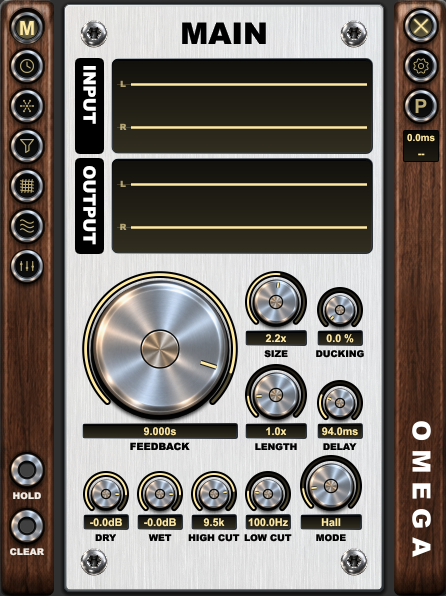
A great reverb has character long after the first reflection. Its texture, movement and tonal balance all influence how a note leaves the room.
Omega lets you shape that journey. Build density, introduce motion and control how different frequencies linger, creating tails that complement the source or take on a life of their own.
COMPREHENSIVE PRESET SYSTEM
Explore a range of spaces and characters, from intimate rooms to expansive atmospheres. Each song has its own selection of presets, revealing different ways Omega can shape the sound.
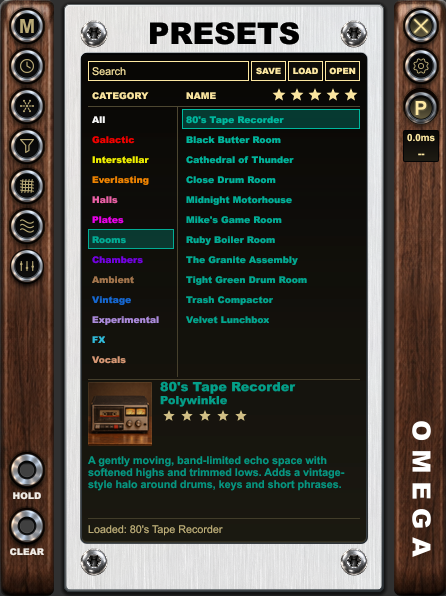
Play a song and try different presets as it plays, to hear how Omega can help enhance your sound.
SHAPE YOUR TAILS
Omega gives you up to 64 reverb tails, each individually switchable, so you can build the response around your source. Explore sparse combinations with a distinct character, or bring more tails together for a fuller, denser space.
Shape how they blend with diffusion, then balance the early reflections against the late reverb.
From a tight drum room to a lingering atmospheric wash, the Tails page gives you a direct way to explore the structure of the reverb, with a display that shows the combined response as you work.
A planned update will add per-tail decay length, panning, modulation, pitching and shimmering.
Place individual tails across the stereo field, give them different lengths, and introduce movement or pitched layers within the space. You could build a short central response surrounded by longer, shifting tails, or let selected tails rise into a shimmering atmosphere while others hold the body of the room.
These additions will bring a much deeper level of control to the Tails page, opening it up as a tool for detailed spatial design and expressive sound creation.
UNFATHOMABLE DECAY CONTROL
The right decay can make a reverb feel like it belongs to the recording. Omega's Frequency Decay gives you detailed control over that response, with independent curves for the left and right channels.
Keep the low end tight while the upper frequencies stretch into a long, open tail. Give a vocal's body room to bloom while its sibilance fades quickly.
Shape a broad tonal region or address a specific resonance, with the graph showing how your choices develop through the decay.
You have the freedom to keep the size and character of a space while deciding which parts of the sound carry it.
Separate the channels, then introduce small differences for a less uniform room, or build contrasting responses that reveal themselves as the tail unfolds. That gives you a powerful way to create stereo depth and character alongside the timing and modulation controls.
For a mix engineer, it means finer control over clarity, density and space. For a sound designer, it opens up an entire field of evolving textures.
From a room that quietly supports the performance to an atmosphere that becomes part of it, you can shape the reverb around the sound you hear in your head.